
Search
You are able to connect Parcely with Pasts (old name Latvijas Pasts) via API and automate the following processes:
You can export both Pasts pick-up point and home-delivery orders from the Parcely app to the Pasts system.
Parcely offers the following Pasts shipping methods:
Please reach out to Pasts support to learn about the countries they ship to and shipping rates.
Go to your store admin and open the Parcely app under “Apps”. Move to Shipping Services→Latvias Pastas. Here you can enable and disable order export by selecting "Automated data exchange".
Parcely uses express.pasts.lv API
Latvian Pastas will ask for your store IP address: 161.35.18.250
Latvian Pasts will provide you API Secret key for express.pasts.lv API that you can place here
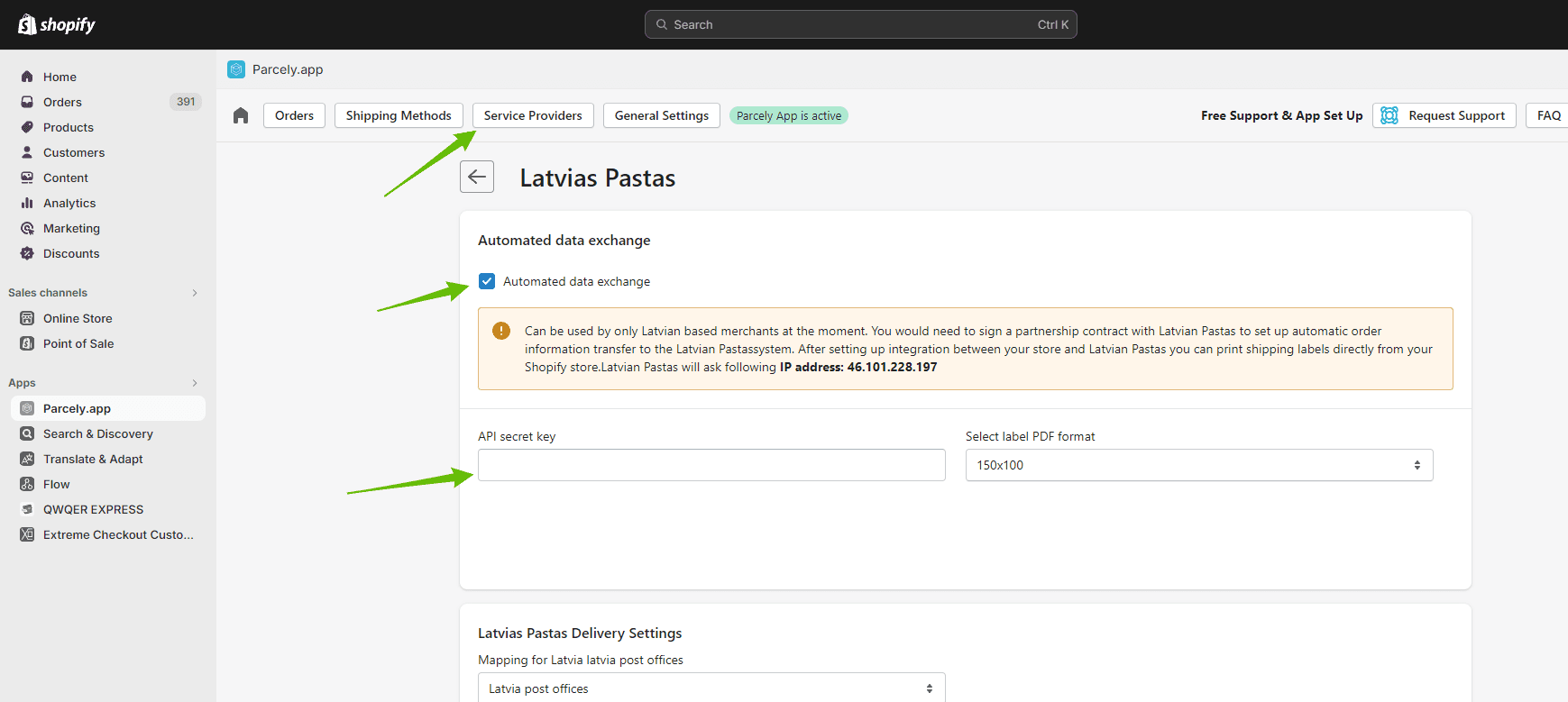
After order exporting has been set up you can print all Latvian Pastas shipping labels from the Parcely app Orders view.
If for some reason the order is not automatically exported, then click on the "Export Order" button and order data will be sent to GLS. In a few seconds, you will see that the label printing button will switch to green and you can print the label by clicking on it.
The tracking code is saved to your store order only if you are fulfilling orders through the Parcely app Orders view. Parcely will save the tracking code itself and GLS tracking URL to the order and also include it in your store order confirmation email. If you would choose to Fulfill orders in Shopify order management, then you would need to copy and paste the tracking code and URL manually.
Powered By SparrowDesk